AI photo editing stopped being one product a long time ago. In 2026 the useful tools are specialists: one strips a background in half a second, another repaints a sky that was never there, a third makes a product shot look like it cost $2,000 to stage. Picking "the best AI photo editor" without saying which job is how people end up paying three subscriptions to do one thing.
So this guide is organised by editing job, not by brand. Every tool below is listed in our AI image tools directory, and each entry says plainly what it is good at, what it is not, and how the pricing actually works.
How We Picked These Tools
Three rules kept this list short:
It has to edit real photos. Text-to-image generators are a different category. A tool earns a place here only if it changes a photo you already have — removing, enhancing, replacing, restoring, or restaging it.
The free tier has to be honest. Several tools on this list have free plans that watermark exports or forbid commercial use. That is fine — but it is stated in the entry rather than buried, because a "free" editor you cannot legally sell with is not free for a business.
Pricing has to be checkable. Every price below was checked against the vendor's own pricing page on 20 August 2026. Where a vendor hides pricing behind sign-up, we say so and label third-party figures as such instead of presenting them as official.
What we could and could not verify: Flair.ai and PixNova AI publish full pricing openly, so those figures are exact. PhotoRoom, Recraft and Playground do not show complete pricing to logged-out visitors, and Canva has repriced Pro recently (trackers currently disagree between roughly $13 and $18/month). Where you see "per third-party trackers" below, treat it as a ballpark and confirm on the vendor's page before you buy.
Best AI Photo Editing Tools in 2026 at a Glance
Best AI Tools for Background Removal and Product Photos
This is the job most people actually mean when they search for an AI photo editor: get the subject out of a messy photo and put it somewhere better.
1. PhotoRoom — Best for Ecommerce Product Photos
PhotoRoom was built for people who photograph things to sell them. Point your phone at a product on a kitchen table, and it cuts the object out, drops it on a clean or generated background, and batches the same treatment across an entire catalogue. Marketplace-ready sizing is built in, which is the part generic editors always miss. It started life as a mobile app, and it is still the most comfortable tool here to run entirely from a phone.
Where it wins: volume. Fifty listing photos with consistent framing is a ten-minute job, not an afternoon.
Where it does not: it is a product-photo tool, not a retoucher. For portrait skin work or landscape edits, use something else.
Pricing: the free plan watermarks exports and is licensed for personal use only — so for an actual store, budget for Pro from day one. PhotoRoom's pricing page lists the tiers (Pro, Max, Ultra, Enterprise, billed yearly) without showing figures to logged-out visitors; third-party trackers put Pro at roughly $7.99/month. Check the plan page while signed in.
2. Cutout.Pro — Best for Batch Cleanup and Photo Restoration
Cutout.Pro is the utility belt of this list: background removal, photo enhancement, upscaling, old-photo restoration and object removal in one credit-based account. The restoration model in particular does a respectable job on scanned family photos — scratches, faded colour, soft focus.
Where it wins: breadth. One credit balance covers a dozen different repair jobs instead of a subscription per job.
Where it does not: the interface is a collection of separate tools rather than one canvas, so complex multi-step edits mean hopping between pages.
Pricing: credit-based, with a free allowance to test each tool. Third-party trackers put image subscriptions in the region of $5/month at the entry level up to around $69/month, with one-time credit packs from roughly $5, and video billed separately. Cutout.Pro does not expose a public pricing page to crawlers, so confirm current tiers on their site.
3. Flair.ai — Best for Branded Product Photoshoots
Flair.ai goes a step past background removal: you stage the shot. Drop your product in, arrange props, surfaces and lighting, and it renders a photoshoot that looks art-directed. For a small brand with no studio budget, that is the difference between "listing photo" and "campaign image".
Where it wins: custom models trained on your actual product, so the same bottle looks like the same bottle across every render.
Where it does not: the free tier is genuinely small — one custom model and five generated images — so evaluate quickly and decide.
Pricing (verified 20 Aug 2026): Free $0, Pro $8/month, Pro+ $26/month, Scale from $38/month, Enterprise custom. Instant and ad generations consume four times the normal image quota.
Best AI Tools for Generative Editing (Add, Remove, Expand)
These are the tools that invent pixels convincingly — filling a gap where a person used to be, or extending a photo past its original frame.
4. Adobe Firefly — Best for Generative Fill and Expand
Adobe Firefly is the safest pick if the edited image is going into commercial work. It is trained on licensed and public-domain content, which matters when a client asks where an image came from, and Generative Fill and Generative Expand are still the most reliable implementations of "remove this / extend that".
Where it wins: commercial defensibility, plus Content Credentials embedded in the output and a straight line into Photoshop and Express.
Where it does not: the credit system confuses people. Credits are consumed by generation quality, not by edit count, so a few high-quality renders can drain a month's allowance.
Pricing: a free tier with a small monthly generative-credit allowance, with paid Firefly plans starting around $9.99/month. Adobe changes this lineup often — check Adobe's plans page for today's tiers.
5. Magic Studio (Canva) — Best for People Who Do Not Edit Photos for a Living
Magic Studio bundles Canva's AI editing into tools with names that explain themselves: Magic Eraser, Magic Expand, Magic Edit, Magic Resize. If your edit ends life as an Instagram post, a slide or a flyer, editing and laying out in the same place saves an export cycle.
Where it wins: the shortest distance between "raw photo" and "finished, correctly sized post".
Where it does not: ceiling, and free-tier reach. Fine retouching, precise masking and colour grading are beyond it — and the Background Remover most people associate with Canva is a Pro feature, not a free one.
Pricing: the free plan is permanent and includes roughly 50 Magic Studio AI credits a month shared across all AI features, which is enough to try things and not enough to work with. Pro unlocks the full credit allowance and Background Remover. Canva repriced recently and trackers currently list Pro anywhere between about $13 and $18/month, so check canva.com/pricing rather than trusting any figure in a blog post — including this one.
6. Playground — Best for Iterating Under a Commercial Licence
Playground gives you a canvas with masking rather than one-click-only edits, which is what you want when an edit takes ten attempts to land. Its real advantage is licensing: the paid tiers carry a worldwide, royalty-free commercial licence covering print-on-demand and client work, which is exactly the clause most cheap editors omit.
Where it wins: a flat monthly price with commercial rights, instead of per-credit maths on every retry.
Where it does not: the free plan is tighter than its reputation suggests — around 10 generations per rolling three-hour window, and personal use only, so no client or storefront work.
Pricing: Free (personal use only), Pro $15/month or $12/month billed annually, Pro Plus $45/month. Figures are from third-party trackers and Playground's own blog; the pricing page is not visible to logged-out visitors.
Best AI Tools for Enhancing, Upscaling and Repairing Photos
7. PixNova AI — Best Free All-in-One Photo Editor
PixNova AI is the answer to "is there a genuinely free AI photo editor". It bundles more than twenty AI utilities — enhancement, upscaling, face swap, object removal, background editing — and gives out free daily credits that cover casual use without a subscription.
Where it wins: price. For occasional cleanup of a blurry or low-resolution photo, most people never need to pay.
Where it does not: free credits expire the same day you claim them, so it suits sporadic jobs rather than a deadline-driven workflow.
Pricing (verified 20 Aug 2026): free daily credits, then one-time credit packs — 1,600 credits for $7.99, 9,000 for $23.99, 16,000 for $34.99, scaling to 100,000 for $194.35. No subscription required.
8. Recraft.ai — Best for Editable, Brand-Consistent Visuals
Recraft.ai is the one tool here that outputs editable vectors alongside raster images, and its editing set covers background removal, inpainting and outpainting. When an edited image has to survive a resize to a billboard, or a brand colour has to change after approval, editable output stops the job from starting over.
Where it wins: brand work — style consistency across a set, and infinitely scalable output.
Where it does not: photographic retouching. This is a design tool that also edits images, not a photo editor that also designs.
Pricing: free tier with limited credits; paid plans sit in the $10–20/month range per third-party listings. Recraft does not show its full pricing table to logged-out visitors, so confirm before subscribing.
Which AI Photo Editor Should You Actually Use?
Match the job to the tool and stop paying for overlap:
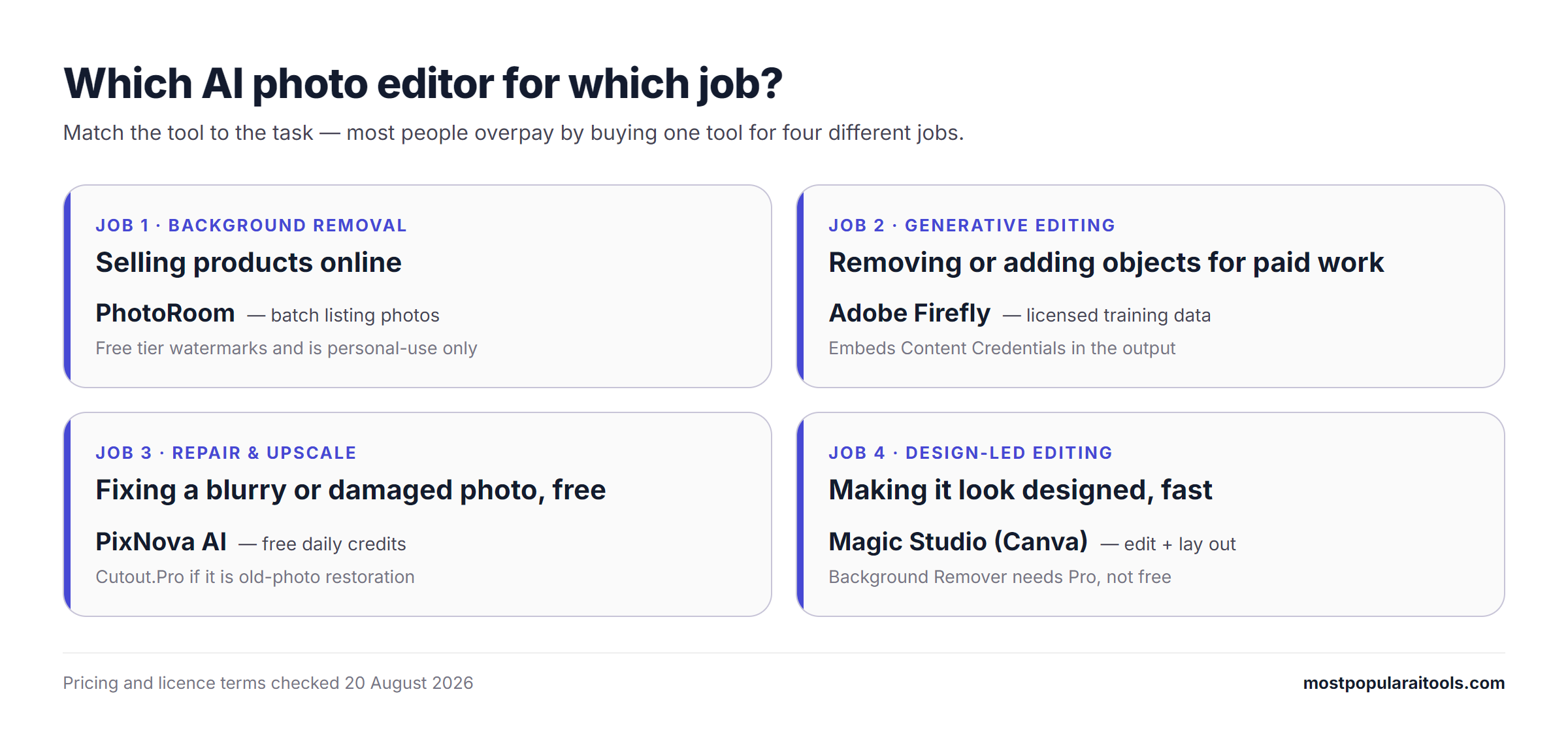
You sell products online → PhotoRoom for volume, Flair.ai when a listing photo needs to look like a campaign.
You need one thing removed from one photo → Adobe Firefly if it is commercial work, PixNova AI if it is not.
You are restoring old or damaged photos → Cutout.Pro.
You are not a designer and the output is social → Magic Studio (Canva).
You are on a strict $0 budget → PixNova AI does the most without a card. Just check the licence before anything commercial.
The image carries a brand → Recraft.ai, because editable beats perfect.
What AI Photo Editors Still Get Wrong in 2026
The demos are better than the daily reality. Four failure modes show up across every tool on this list:
Hands, teeth and fine text. Generative fill still invents six-fingered hands and illegible signage. Zoom in before you publish.
Reflective and transparent objects. Glass, chrome and liquid confuse background removal — expect halos and manual cleanup on jewellery and bottles.
Repeated subject consistency. Ask for the same product across ten scenes and small details drift. Custom models (Flair.ai) reduce this; nothing eliminates it.
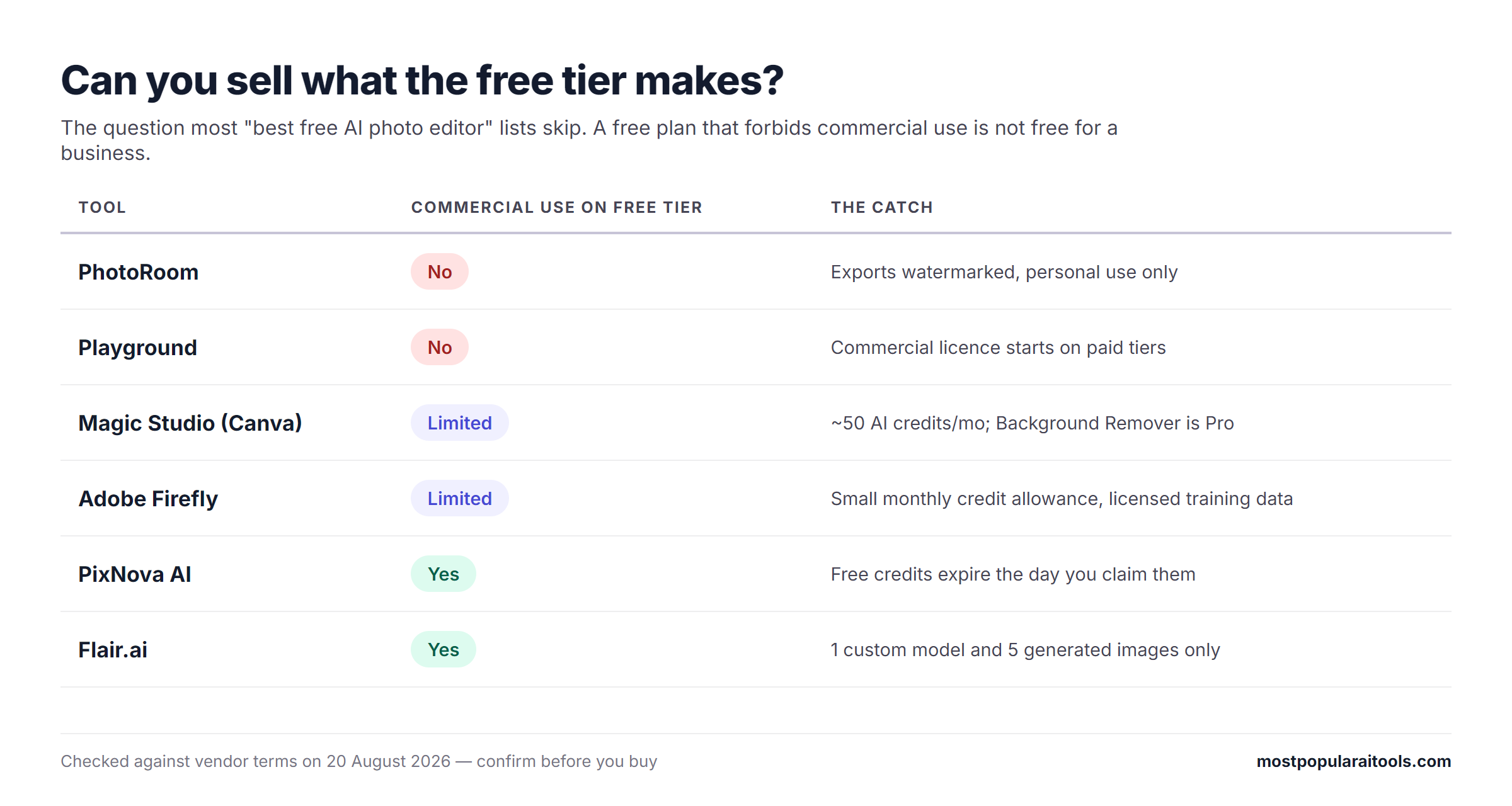
Licensing on free tiers. PhotoRoom and Playground both restrict free output to personal use, and watermarks are the least of it — using a free-tier export on a storefront can breach the terms you agreed to.
Frequently Asked Questions
What is the best AI photo editor in 2026?
There is no single best one, which is why this list is split by job. For ecommerce product photos, PhotoRoom. For generative edits in commercial work, Adobe Firefly. For free everyday cleanup, PixNova AI. For non-designers, Canva's Magic Studio.
Is there a genuinely free AI photo editor?
PixNova AI is the closest thing on this list: free daily credits across enhancement, upscaling and object removal, with no card required. Canva's free plan is permanent but gives only about 50 AI credits a month and keeps Background Remover behind Pro. PhotoRoom and Playground both have free tiers, but restrict them to personal use.
Can AI photo editors replace Photoshop?
For single-purpose jobs — removing a background, expanding a frame, upscaling a low-resolution file — yes, and usually faster. For layered composites, precise masking and colour grading, no. Most professionals use an AI tool for the first 80% and finish in a traditional editor.
Are AI-edited photos safe to use commercially?
Two separate questions decide this: what the model was trained on, and what your plan's licence permits. Adobe Firefly is trained on licensed and public-domain content and is the most defensible on the first count. On the second, free tiers are where people get caught — PhotoRoom's and Playground's free plans are personal-use only, so a paid tier is not optional for a business.
Do these tools work on a phone?
PhotoRoom, Canva and PixNova AI all run well on mobile, and PhotoRoom was designed phone-first. Firefly, Flair.ai, Recraft and Playground are far more comfortable on a desktop browser.
The Short Version
Start with the job, not the brand. Removing backgrounds at volume is PhotoRoom. Inventing pixels for paid work is Firefly. Fixing an old or blurry photo for free is PixNova AI. Making it look designed without being a designer is Canva. Everything else on this list is a sharper version of one of those four jobs.
You can compare all of these side by side in our AI image tools category, and if you want better output from any of them, our image prompt templates are a faster starting point than a blank prompt box.