Compiled by Amit Kumar
StayCharted is a no-code tool that trains private text and image classification models on examples your team has already labeled, then uses them to fill the category column in new files or answer through an API. It is built for operations, support and finance teams. A Free workspace costs $0; paid workspaces start at $49 a month.
MPAT read the StayCharted homepage, the StayCharted pricing page, the API reference, the security page, the terms of service, the privacy policy and the release notes on 6 October 2026. This page is compiled from those vendor pages. It is not a hands-on review: MPAT did not create an account, upload data or train a model. The vendor calls the product StayCharted AI Model Trainer, or AMT for short. The release notes date the public opening to 29 September 2026, and the product was featured on Product Hunt on 6 October 2026. It also launched on the MPAT launch board, where this listing lives at /tools/staycharted.
StayCharted in one paragraph
StayCharted turns a spreadsheet of past decisions into a model that makes the same decision on new rows. You upload text or photos that already carry the right category, such as support tickets tagged Billing or Bug Report, expense lines with their ledger codes, or product photos sorted into folders. The service checks the labels, flags personal data it can recognize, trains a model and tests it on examples it never saw. You then fill a CSV, Excel or JSON file, call the model from your own systems, or use it from Claude or ChatGPT. Unsure answers are marked for a person to check. Billing is per workspace, not per seat: as of 6 October 2026, Free is $0 a month with 10,000 rows filled, Essentials is $49 and Business $99, with image models as a paid add-on. It suits teams that sort the same kinds of records every day.
What StayCharted does
The features below come from the product, models, security and developer pages, read on 6 October 2026. The vendor's screenshots use sample data.
- Five model types. A word-based Classifier Model on every plan; an AI Classifier Model that also reads meaning through a shared pre-trained language model; a Dedicated AI Model that fine-tunes a language model on your examples (Business); and two picture models with the Vision add-on, according to the model comparison page.
- Data checks before training. It looks for duplicate rows, category names that seem to mean the same thing, categories with too few examples and, for pictures, likely mislabeled images.
- Personal-data masking. Text is scanned for email addresses, phone and card numbers, IBANs, US Social Security numbers, IP addresses, passwords and API keys. You can mask them, leave those rows out or keep them, and a masked model masks new text too.
- Validation report. Every training run reports accuracy on held-back examples, accuracy per category and the rows the model got wrong, with a button to fix a bad label.
- File filling. Upload new rows and download them with a predicted category and a confidence score; low-confidence rows are marked for checking.
- Prediction API. Three endpoints and per-workspace keys, from Essentials up. The API reference sets a shared rate limit of 30 records a minute on Essentials and 60 on Business.
- Claude and ChatGPT connector. Added on 1 October 2026, it lets an assistant read model reports, categorize pasted text and start training, with confirmation required before training or publishing.
- Teams. Unlimited members with Owner, Builder, Reviewer and Viewer roles, plus an activity log of every action.
Who it is for, and who should skip it
A good fit if your team already has hundreds or thousands of records with an agreed category, and someone still applies those categories by hand. Ticket routing, expense coding, product categorization, contract-clause tagging and photo sorting are the examples the vendor uses. It also suits a software company that wants to add customer-specific classification through an API without hiring a machine-learning engineer.
Skip it if you have no labeled history; the tool learns from your past answers and does not invent categories. Skip it as well if you need text pulled out of receipts or forms, because the pricing FAQ says Vision recognizes what a picture shows, not the words written in it. High-volume real-time use is limited by the per-minute API cap, and the vendor itself points large batches to file uploads. The service opened on 29 September 2026 and is run by a new company based in Austin, Texas, so a team with strict vendor-review rules should read the data processing addendum first.
Plans and prices
| Plan | Price | What you get | Where the tier stops |
|---|---|---|---|
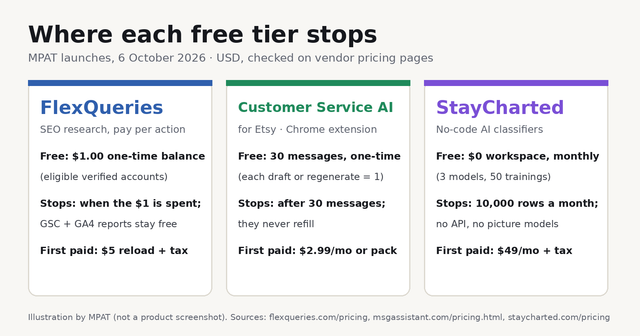
| Free | $0 | 3 models (one can be an AI Classifier Model), 50 trainings a month, 1,000 rows per training file, 10,000 rows filled a month, file downloads, unlimited members | One Free workspace per account; no API, no Vision, no Dedicated AI Model |
| Essentials | $49 | 5 AI Classifier Models, 100 trainings a month, 5,000 rows per training file, 25,000 rows filled a month, API | Vision costs $49 a month more; no Dedicated AI Model |
| Business | $99 | 15 AI Classifier Models plus 3 Dedicated AI Models, 150 AI Classifier and 5 Dedicated trainings a month, 50,000 rows filled a month, API | Vision costs $99 a month more |
| Enterprise | Custom | Limits, terms and pricing set with the vendor | Sales contact only |
Each paid workspace is a separate monthly subscription that renews automatically until the Owner cancels. The terms of service (updated 1 October 2026) say fees are not refunded for partial months, except where the law requires. Plans can also be bought through AWS Marketplace and paid on an AWS bill.
Where the free plan stops, and what paid workspaces really cost
The Free workspace is permanent, but it is a text-only sandbox. It allows one meaning-aware AI Classifier Model, training files of 1,000 rows and 10,000 filled rows a month. Filled files can be downloaded, but the Prediction API, picture models and Dedicated AI Models all need a paid plan.
There is no metered overage. The terms say work that would exceed an allowance is refused, and the pricing FAQ adds that you are offered an upgrade instead of an extra bill. Rows filled in files, API calls and assistant categorizations all draw on the same monthly row budget.
Image work raises the bill. By MPAT's arithmetic from the published prices, Essentials with Vision comes to $98 a month per workspace and Business with Vision to $198, before tax. Separate teams usually mean separate workspaces; the pricing page's own example is three Essentials workspaces at $147 a month. Members are free, so adding colleagues to one workspace costs nothing.
How accurate is StayCharted?
MPAT has not measured it. The vendor publishes its own benchmark results, including 93.7% accuracy for a Dedicated AI Model on 3,080 held-out messages from the public BANKING77 banking-intent dataset. The same page says datasets and test conditions differ, and that review projections are estimates, not measured human-review results. Treat these figures as the vendor's claims. The figure that matters is the validation report on your own data.
How it compares to tools already on MPAT
- NiroHelp, the WordPress help desk with AI answers from your docs, is free for docs and tickets on WordPress.org, with paid AI plans from $9.99 a month, per its MPAT listing checked 28 September 2026. NiroHelp answers customers; StayCharted only sorts records, such as routing a ticket to the right queue.
- Veltrix, the AI finance copilot for books and cash, starts at $49 a month after a 14-day trial with no permanent free plan, per its MPAT listing checked 2 October 2026. Veltrix answers questions about connected accounting data; StayCharted would code expense lines against categories you define.
- Viktor, the AI employee for Slack and Teams, gives $100 in starting credits and Team plans from $50 a month, per its MPAT listing checked 4 October 2026. Viktor is a general agent that does many jobs; StayCharted does one narrow job and reports how often it gets it right.
For more tools that take repetitive work off a team, browse automation tools on MPAT.
Is StayCharted free?
Yes, for limited text work. Each account gets one Free workspace at $0 a month, with three models, one of which can use AI, and 10,000 filled rows a month. The API and image models need Essentials at $49 a month or higher. Prices checked on 6 October 2026.
How much does StayCharted cost?
Essentials is $49 and Business $99 per workspace a month, in US dollars before tax. Vision adds $49 on Essentials or $99 on Business, and Enterprise is priced on request. There are no per-seat or per-model charges.
What happens to the data I upload?
The privacy policy (updated 5 October 2026) says uploaded content is not used to train base models or models for other customers. Original uploads are deleted 90 days after upload, and filled files 24 hours after first download, or after 7 days if never downloaded, per the security and retention page. Trained models remain until you delete them, and customer content is stored and processed in the United States. The policy asks customers not to upload health, biometric, government-ID or payment-card data without a written agreement. The terms also bar using the service to profile identified people or for surveillance.
Can I use StayCharted without writing code?
Yes. Training, testing and filling files all happen in the browser, and the Free plan works through file downloads. The API is optional and needs Essentials or Business. The Claude and ChatGPT connector is switched off until a workspace Owner turns it on.
Sources
Plan names, prices and allowances come from the pricing page and its FAQ. Billing rules come from the terms of service (effective 28 September 2026, updated 1 October 2026). Features come from the how-it-works page, the model comparison, the API reference and the release notes. Data handling comes from the privacy policy and the security page. All pages were read on 6 October 2026.