Compiled by Amit Kumar
VocaScript is a browser-based AI transcriber that turns long audio and video files, public media links and browser tabs into timestamped, speaker-labelled text in more than 100 languages. It suits students, podcasters, researchers and creators. There is a free plan with 120 minutes a month, and paid plans run from $10 to $100 a month.
MPAT read the VocaScript homepage and FAQ, the VocaScript pricing page, the Terms of Service, the Privacy Policy, the refund policy and the acceptable use policy on 9 October 2026. This listing is compiled from those vendor pages. It is not a hands-on review: MPAT did not buy a plan or measure transcript accuracy for this page.
What VocaScript does
You start a transcription in one of three ways. You can upload an audio or video file, paste a link to public media such as a podcast episode or a YouTube video, or use the Chrome extension to transcribe the media on the page you are already viewing. The result opens in a web editor with speaker labels, timestamps and a player, and the same workspace is used whichever way the file came in.
The homepage FAQ and the vendor's product gallery describe these tools:
- Long recordings in one pass. Paid plans accept a single file of 4, 8 or 16 hours, depending on the plan, so a full lecture or interview does not have to be cut into pieces first.
- Speaker detection and timestamps. Speakers are separated into labelled blocks. A Timestamp Editor shifts misaligned times.
- Retranscribe a range. Select a passage that came out wrong, such as a name or an acronym, add instructions, and regenerate only that part. The gallery shows Precise, Conversation and Studio modes in this dialog.
- Proofread. An AI pass fixes spacing, spelling and grammar while keeping the speaker's wording.
- Translation. Choose an output language before you start, or translate a finished transcript or selected segments.
- Chat and "Send to AI". Paid plans can chat with a transcript and jump to the cited timestamp. A button opens ChatGPT or Claude with the transcript already loaded.
- Exports. Every user gets TXT and copy-to-clipboard. Paid plans add SRT and VTT subtitles and JSON.
- Browser extension. Records tab audio, shows captions on the page and can use your signed-in session for media you may view.
The FAQ says the model is told to write verbatim and mark unclear speech as [inaudible] rather than guess, and that very long files fail more often. Mobile browsers handle uploads and public links; the extension is desktop-only.
Who it is for, and who should skip it
VocaScript fits people who transcribe recordings after the fact: students with recorded lectures, podcasters and YouTubers who need subtitle files, journalists and researchers with long interviews, and anyone who wants text from a video they already have rights to. The free account is enough to test quality on a short clip. Plus, at $10 a month for 30 hours, is priced for regular personal use.
Skip it if what you need is a meeting assistant. VocaScript does not join calls or send recaps to a CRM; it works on media you hand it. Skip it if you need a team workspace, since no seats, shared folders or admin controls are listed on the pricing page. Be careful if your recordings are confidential: the privacy policy says media and transcripts are processed by third-party AI services but does not name them, and it does not say whether customer content is excluded from model training. And skip the link feature for content you do not own. The acceptable use policy bans transcribing material you have no rights to, getting around DRM, and bulk extraction from platforms.
VocaScript is a web app and Chrome extension for AI transcription of audio and video. You upload a file, paste a public media link, or capture the media on the page you are viewing, and get timestamped, speaker-labelled text in more than 100 languages, with translation, proofreading and segment retranscription. A free account gives 120 minutes a month, up to 25 minutes per file and 15 transcriptions a day, with TXT export. Paid plans are priced in US dollars before tax: Plus at $10 a month for 30 hours, Pro at $25 for 80 hours and Max at $100 for 320 hours. They allow single files of 4, 8 or 16 hours and add SRT, VTT and JSON exports. Minutes reset on the first day of each calendar month. First paid purchases can be refunded within 14 days. VocaScript is built for students, podcasters, researchers and creators working with recordings they have rights to. MPAT read these facts on VocaScript's own pages on 9 October 2026.
Plans and prices
| Plan | Price | What you get | Where it stops |
|---|---|---|---|
| Guest (no account) | $0 | Upload or link transcription in the browser; work stays on your device | 3 transcriptions a day, up to 5 minutes each |
| Free | $0, no card | 120 minutes a month; 2 GB uploads; 1 GB storage; 20 AI credits a month; speaker labels; extension; TXT export | 25 minutes per file, 15 transcriptions a day; media deleted after 7 days (transcripts kept); no SRT/VTT/JSON; no transcript chat |
| Plus | $10/month + tax | 30 hours a month; 4 GB uploads; 10 GB storage; 5 Studio hours; 600 AI credits; transcript chat; all export formats; priority processing | 4 hours per file; no daily cap |
| Pro | $25/month + tax | 80 hours a month; 8 GB uploads; 50 GB storage; 10 Studio hours; 1,500 AI credits; higher priority | 8 hours per file |
| Max | $100/month + tax | 320 hours a month; 16 GB uploads; 200 GB storage; 20 Studio hours; 6,000 AI credits; highest priority | 16 hours per file |
Annual billing is offered with a "2 months free" label. The annual amounts are not in the page source MPAT read, so they are not quoted here. Check the toggle before you pay. Prices exclude sales tax or VAT, which is added at checkout, and cards are charged in US dollars.
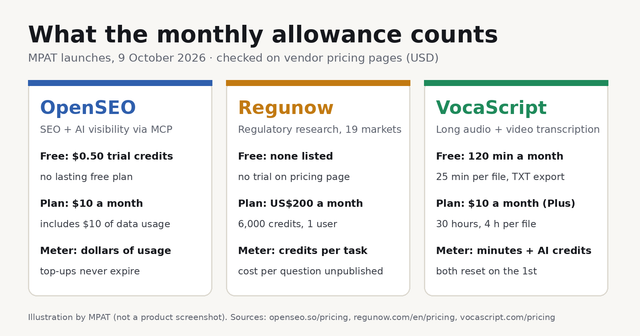
Two meters run side by side. Transcription minutes cover audio processing, including any segment you retranscribe. AI credits cover text work: proofreading, summaries, chat, translation and word timings. Both reset on the first day of each calendar month, not on your billing date. Files over the per-file limit are transcribed only up to that limit. The pricing page lists Studio hours per plan but does not define Studio; the product gallery shows it as one of the retranscription modes.
The refund policy gives a full refund within 14 days of your first paid purchase, once per account. After that, fees for the current period are not refunded, but you can cancel at any time and keep access until the period ends. The terms promise 30 days' notice of price changes.
How it compares to tools already on MPAT
Tactiq is the closest browser-extension listing on MPAT. It transcribes Google Meet, Zoom and Teams calls live without sending a bot into the call. MPAT's 24 September 2026 check found a free plan with 10 transcripts and 5 AI credits a month, and Pro at $8 a user a month billed annually. Choose Tactiq for live meetings. Choose VocaScript for recordings, podcasts and videos you already have, especially long ones.
Fathom records and summarises meetings and syncs follow-ups to a CRM. MPAT's 24 September 2026 check found unlimited recording and transcription on its free plan, and Premium at $20 a month or $16 billed yearly. It is a meeting notetaker, not a file transcriber.
Submagic is the pick if the goal is styled captions burned into short social videos. MPAT's 24 September 2026 check found Starter at $19 a month for 15 videos of up to two minutes. VocaScript exports plain SRT and VTT files and does not edit video.
Browse more audio AI tools on MPAT, or see what launched today on the MPAT launch board. VocaScript launched on MPAT on 9 October 2026, and this listing lives at /tools/vocascript.
Is VocaScript free?
Yes, within limits. Guests can run 3 transcriptions a day of up to 5 minutes each without signing up. A free account raises that to 120 minutes a month, 25 minutes per file and 15 transcriptions a day, with TXT export and media kept for 7 days. Checked 9 October 2026.
How much does VocaScript cost?
Plus is $10 a month for 30 hours, Pro is $25 a month for 80 hours and Max is $100 a month for 320 hours, all in US dollars before tax. Annual billing is advertised as "2 months free". Per-file limits are 4, 8 and 16 hours.
What is VocaScript used for?
Turning long recordings into editable text: lectures, interviews, podcasts, webinars and videos. It also makes SRT or VTT subtitle files, translates transcripts, and hands text to ChatGPT or Claude for summaries.
Is VocaScript private?
The VocaScript Privacy Policy (last updated September 2026) says media and transcripts are sent to third-party AI services for processing, without naming them, and that VocaScript does not sell audio or transcripts. Voice profiles for speaker labels stay on VocaScript's servers, are not used to identify people, and are deleted with the file. When you start a transcription from the extension, it can send the media site's login cookies to VocaScript to fetch the file. That option is on by default and can be switched off with the "Include Auth Cookies" toggle. The policy says they are deleted after processing.
Can VocaScript transcribe YouTube or TikTok links?
Yes, for publicly playable media you have rights to. The site lists transcriber pages for YouTube, TikTok, Instagram, Vimeo, Zoom, Spotify and more. If a link fails, use the extension or upload the file.
Who makes VocaScript?
The founder is Diae Louali, who presented VocaScript on its Product Hunt page on 9 October 2026. The terms are governed by the laws of Morocco, but no company name appears on the legal pages.
Sources
Plan prices, minute limits, AI credits, reset rules and the annual toggle come from the VocaScript pricing page and pricing FAQ. Guest limits, features, the verbatim instructions and the mobile notes come from the VocaScript homepage FAQ. Billing, renewal, the governing law and media retention come from the VocaScript Terms of Service (August 2026). Data handling, voice profiles and the extension's cookie use come from the VocaScript Privacy Policy (September 2026). The 14-day refund rule is in the VocaScript refund policy, and the permitted and banned uses are in the VocaScript acceptable use policy. The launch date and founder come from VocaScript on Product Hunt. All pages were read on 9 October 2026.