Compiled by Amit Kumar
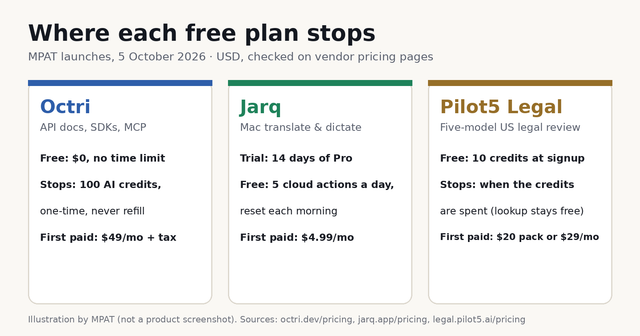
Jarq is a macOS menu-bar app that translates, shortens, fixes or rewrites selected text in place, and types dictated speech at your cursor, in any app. It is built for people on Apple Silicon Macs who write across languages. After a 14-day trial, the Free plan allows 5 actions a day; Pro costs $4.99 a month.
MPAT read the Jarq homepage, the Jarq pricing page, the setup and how-it-works guides, and the legal pages on 5 October 2026. This listing is compiled from those vendor pages. It is not a hands-on review, and MPAT did not install or time the app for it. According to the About page, Jarq is made by Birzhan Abishev, a product designer from Kazakhstan, and is sold through a sole proprietorship registered in Astana in 2019. Jarq appeared on Product Hunt's daily board on 5 October 2026 and also launched on the MPAT launch board, where this page lives at /tools/jarq.
Jarq in one paragraph
Jarq puts translation, editing and dictation where your text already is, so you do not copy text into a translator or chatbot tab and paste it back. When you select text in any Mac app, a small dot appears next to it. Point at the dot and buttons open for Translate, Improve, Short, Tone, Ask or an instruction you wrote yourself. The result replaces your selection or waits in a bubble to copy. A second hotkey starts dictation, and Jarq can type in a different language from the one you spoke. It covers 13 languages. As of 5 October 2026, every install starts with 14 days of Pro, with no card and no account. After that, Free allows 5 cloud dictations or translations a day. Pro costs $4.99 a month or $39 a year, and a Lifetime licence is $179 once, tax included. Jarq needs an Apple Silicon Mac running macOS 13 or later.
What Jarq does
The How Jarq works guide describes two ways in: select text, or press a key. Everything else hangs off those two moves.
- Selection actions. Select text in a browser, a PDF, Mail or a native window and a dot appears beside it. The buttons include Translate (replace in place), Just understand (read a translation without changing the original), Improve (shows every change before it lands), Short, Tone (formal, friendly or simpler), Ask, and Translit, which turns Latin letters back into Cyrillic. You can add your own button from a one-line instruction such as "fix the grammar". The homepage says selected text is treated only as material, never as a command.
- The ⌥T fallback. Figma, terminals and Telegram do not report selections to macOS, so the dot never shows there. Pressing ⌥T copies the selection itself, opens the same buttons, and puts your clipboard back afterwards. With nothing selected, ⌥T opens Ask.
- Dictation at the cursor. Press ⌥` (Option and the backtick key), speak, and press it again. Punctuated text lands in whatever field you were in. A push-to-talk mode and remappable keys are in Settings. You can speak Russian and have English typed, or start with "Jarq" to ask a question out loud.
- On-device dictation. The Jarq setup guide describes an optional 632 MB speech model. Once it is downloaded, dictation in the language you speak runs offline on the Mac. Translation, the text actions and Ask still use the cloud.
- Formatting that survives. The Notion page says translated blocks come back as the same blocks, keeping headings, toggle headings, callouts, columns, to-dos, dates and mentions. Similar pages cover Slack mentions and Google Docs fonts, colours and numbering.
- Local history. Up to 500 recent dictations and translations stay in a file on your Mac. You can delete single entries, clear the list or switch history off.
Setup asks for two macOS permissions: Accessibility, so Jarq can read the selection and type the answer, and Microphone, for dictation only. The how-it-works guide says Jarq does not ask for screen recording or input monitoring.
Who it is for, and who should skip it
A good fit if you read and reply in two languages every day, for example a team chat in one language and client email in another. It also suits people who keep a translator or chatbot tab open just to clean up short messages, and people who would rather dictate than type into Slack, Mail or an IDE. Notion and Google Docs users who translate whole sections gain the most from the formatting handling, because a translated page does not need rebuilding.
Skip it if you use Windows, Linux or an Intel Mac. The setup guide says plainly that Jarq does not run on Intel processors. Skip it as well if you need an API or a server-side translation pipeline. Jarq's own summary for AI assistants says there is no public API. Teams that need admin controls, shared glossaries or per-seat billing will find none of that on the pricing page. A licence is personal and covers two Macs.
Plans and prices
| Plan | Price | What you get | Where the tier stops |
|---|---|---|---|
| Trial | $0 for 14 days | Full Pro access on every new install, no card, no account | Moves to Free on day 15 |
| Free | $0, no expiry | 5 dictations or translations a day; unlimited on-device dictation; history on your Mac | Daily cap on cloud actions, reset each morning |
| Pro Monthly | $4.99/month | Unlimited dictation and translation, up to 2 Macs, updates while subscribed | Fair-use ceiling of 2,000 actions a month per licence |
| Pro Yearly | $39/year (about $3.25 a month) | Everything in Pro Monthly, one charge a year | Same 2,000-a-month ceiling |
| Lifetime | $179 once (launch price; $200 shown struck through) | Everything in Pro plus all future versions, up to 2 Macs | Same ceiling; covers the product's lifetime, per the terms |
Jarq says the 2,000-action ceiling sits far above heavy daily use, and that it will write to you before acting on it. Payments go through Paddle as merchant of record, by card, PayPal or Apple Pay. The refund policy (effective 10 August 2026) offers 30 days on a first purchase, no questions asked, and a refund on a surprise renewal if you ask within 14 days. The terms of service (effective 2 October 2026) define Lifetime as covering every release for as long as Jarq runs the service, with at least 60 days' email notice if the cloud service ever closes.
What counts against the free limit
Only work that reaches Jarq's servers counts. That means translations, the text actions such as Improve or Short, and dictation that types a different language from the one you spoke. Dictation through the on-device model never counts, on any plan. Five cloud actions a day covers a few translated messages, and the pricing page itself says it is not enough for a working day. If you cancel Pro, the terms say Jarq keeps working to the end of the paid period and then returns to the Free plan. One FAQ line on the pricing page says dictation and translation "stop" after cancelling. MPAT treats the terms as the binding text.
How it compares to tools already on MPAT
- Raycast, the Mac command bar with paid AI, is a launcher first. Its MPAT listing (checked 24 September 2026) says the free tier excludes Raycast AI, dictation and the translator, and Pro is $10 a month or $96 a year for 500 AI credits. Jarq does one narrower job, text and voice at the cursor, for about half that monthly price, with a small free daily allowance.
- Pip, the Mac AI buddy that points where to click, reads your screen and shows you which control to use (Free 30 questions a month; Pro $15 a month, per its MPAT listing checked 29 September 2026). Pip helps you work an app. Jarq changes the words you are writing inside one.
- Squint, the drag-a-box screen assistant, answers questions about a region of your screen (Free 3 captures a day; Plus $10 a month or $99 a year, per its MPAT listing checked 30 September 2026). That listing says Squint ships for Windows and Linux, with macOS still marked coming soon. Jarq is the reverse: Mac-only today.
For more desktop helpers, browse productivity tools on MPAT.
Is Jarq free?
Partly. Every install gets 14 days of Pro free, without a card or an account. After that the Free plan is $0 with no expiry and allows 5 dictations or translations a day, plus unlimited dictation through the optional on-device model. Prices checked on 5 October 2026.
How much does Jarq cost?
Pro is $4.99 a month or $39 a year. Lifetime is $179 once at the launch price shown against $200. All prices are in USD with tax included, and one licence covers two of your own Macs. There is no team or student plan listed. The pricing page asks people who need one to email.
What is Jarq used for?
Replying in a language you do not write quickly, translating a Notion page or a Google Docs section without breaking its formatting, tightening an email draft, and dictating straight into Slack, Mail or a code editor. All of it happens in the app you already have open.
Does Jarq store or train on my text and voice?
According to the Jarq privacy policy (effective 2 October 2026), no. Audio and selected text are processed in memory and not stored, and they are not used to train any model. The named processors are Cloudflare and Groq for transcription and translation, Paddle for payments and Plunk for email. Jarq does keep an installation identifier, the computer name and monthly usage counts, and the policy caps each of those at up to 24 months. A tally of setup steps can be switched off in Settings.
Does Jarq work offline or on Windows?
Dictation works offline once the on-device model is installed. Translation, the text actions and Ask need a connection. Jarq runs only on Apple Silicon Macs (M1 or later) with macOS 13 Ventura or newer. There is no Windows, Linux or Intel build.
Sources
- Jarq pricing, free plan and fair-use limits (last updated 29 September 2026)
- How Jarq works: selection buttons, hotkeys and what runs in the cloud
- Jarq setup guide: requirements, permissions and on-device dictation
- Jarq privacy policy (effective 2 October 2026)
- Jarq terms of service: plans, Lifetime and fair use (effective 2 October 2026)